
As digital payments become the backbone of online business, virtual cards have evolved from a convenience into an operational necessity. Whether you're paying for advertising, SaaS tools, cloud infrastructure, or subscriptions, knowing how to create a virtual card using Buvei can significantly improve payment reliability, security, and financial control.
This guide explains what virtual cards are, why they matter, and walks you through the exact process to create one with Buvei.

What Is a Virtual Card and Why It Matters
A virtual card is a digitally issued payment card that functions like a traditional Visa or Mastercard — but without the physical plastic.
Instead of relying on your primary bank account for every transaction, virtual cards allow you to create controlled payment channels tailored to specific uses.
Why Virtual Cards Matter Today
-
Online spending continues to rise
-
Subscription-based services dominate software and media
-
Cross-border payments are now routine
-
Fraud risks are increasing
Virtual cards help modern businesses and individuals operate with greater financial precision.
Key Advantages
✅ Protect your primary banking details
✅ Set spending limits
✅ Issue cards instantly
✅ Replace compromised cards quickly
✅ Track transactions in real time
Simply put, they transform payments from reactive to strategic.
Common Use Cases for Virtual Cards
Virtual cards are flexible enough to support both personal and enterprise workflows.
Popular Applications
Advertising Payments
Assign dedicated cards to platforms like Google Ads, Meta Ads, or TikTok to prevent campaign interruptions.
SaaS and AI Tools
Manage recurring payments for tools such as ChatGPT, Canva, and Notion with predictable budgets.
Cloud Infrastructure
Isolate billing for AWS, Google Cloud, or other providers to reduce financial exposure.
Subscriptions
Avoid renewal conflicts by separating services across multiple cards.
Team Expenses
Issue individual cards with preset limits instead of sharing sensitive payment credentials.
Segmented payments create operational resilience.
Why Choose Buvei for Virtual Cards
Not all virtual card providers are designed for scalability. Buvei focuses on stability, flexibility, and global payment compatibility.
Key Advantages of Buvei
✔ Multiple BIN support to improve payment success rates
✔ Strong compatibility with major ad platforms and SaaS tools
✔ USDT funding for faster, lower-cost transfers
✔ Instant card issuance with minimal friction
✔ Transparent fee structure
✔ PCI DSS–aligned security standards
✔ Multi-card management from a single dashboard
✔ Real-time customer support
Even better — new users receive a $5 card issuance coupon upon registration, and long-time inactive users may receive up to 40% discount coupons, making onboarding even more cost-efficient.
Step-by-Step: Creating a Virtual Card with Buvei
Setting up your first virtual card takes just a few minutes.
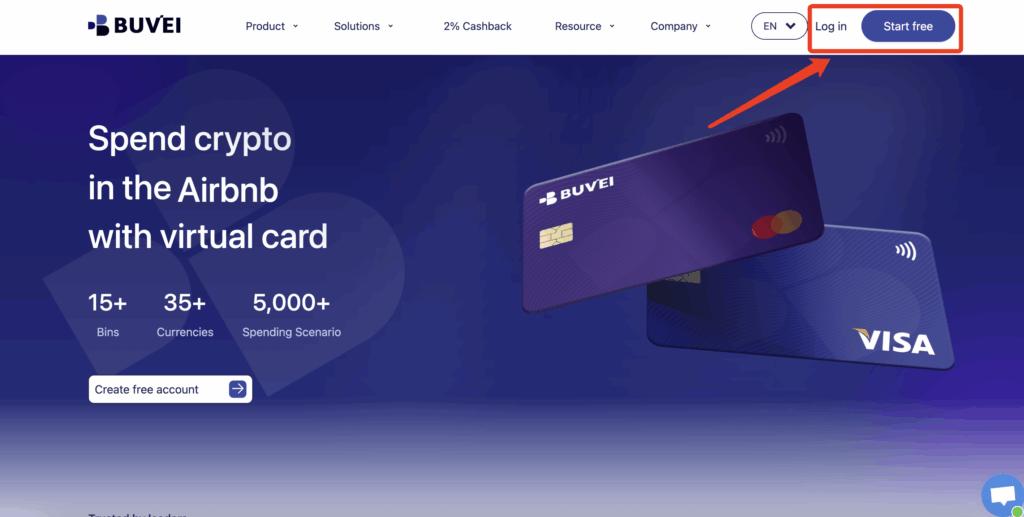
Step 1: Register a Buvei Account
-
Visit https://buvei.com
-
Create a free account
-
Complete email verification
-
Log in to the Buvei dashboard
The platform is designed for quick onboarding so you can begin issuing cards without unnecessary delays.
Step 2: Fund Your Account
-
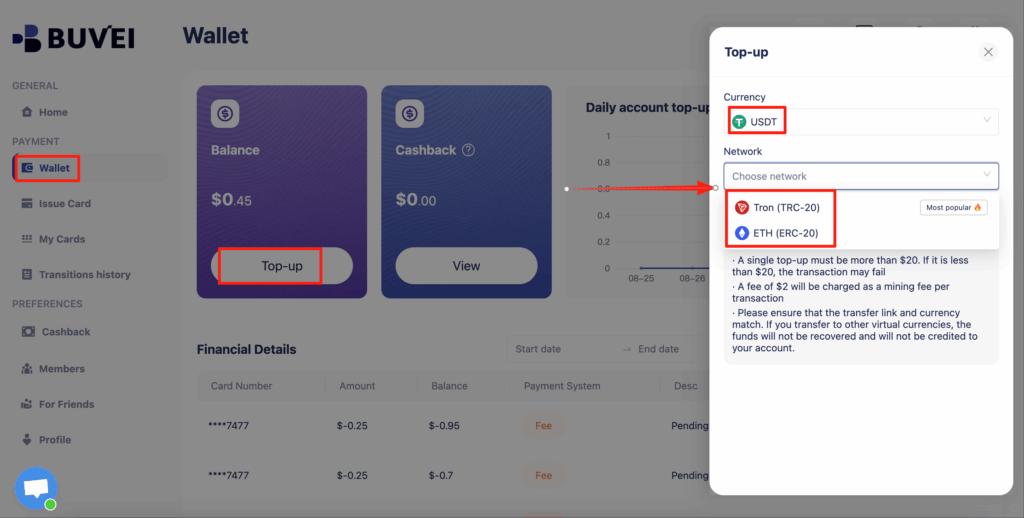
Navigate to the Wallet tab
-
Select USDT (TRC20 or ERC20)
-
Copy your exclusive deposit address
-
Send your funds
-
Once confirmed, your balance will appear and be ready for immediate use
Crypto funding helps reduce remittance costs while accelerating access to working capital.
Step 3: Create Your Virtual Card
-
Go to the Cards tab
-
Choose your preferred BIN region (U.S. BIN recommended for higher international acceptance)

-
Select your card type
-
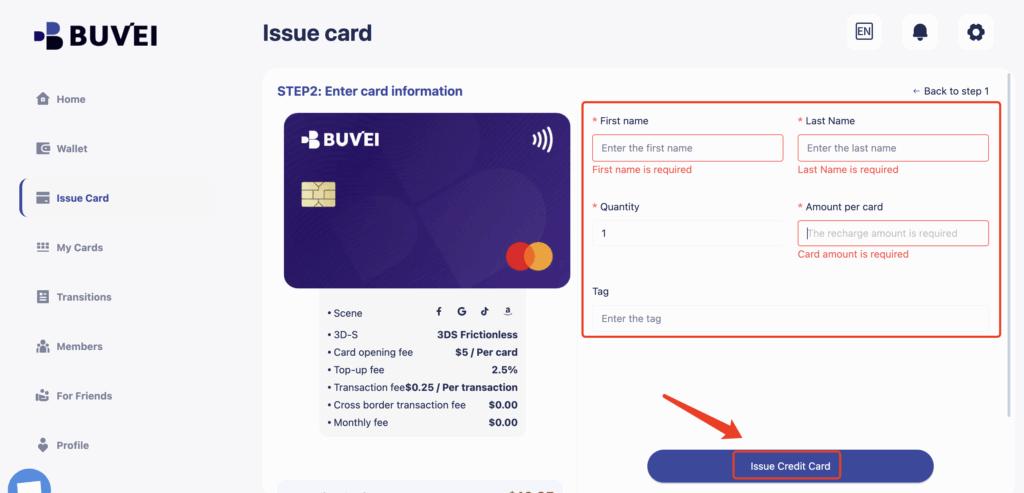
Click Issue Card
-
Enter the required details:
-
Card name (e.g., “SaaS Tools”)
-
Amount
-
Card quantity
-
-
Confirm issuance
You now have a fully functional virtual card ready for online payments.
Step 4: View Your Card Details
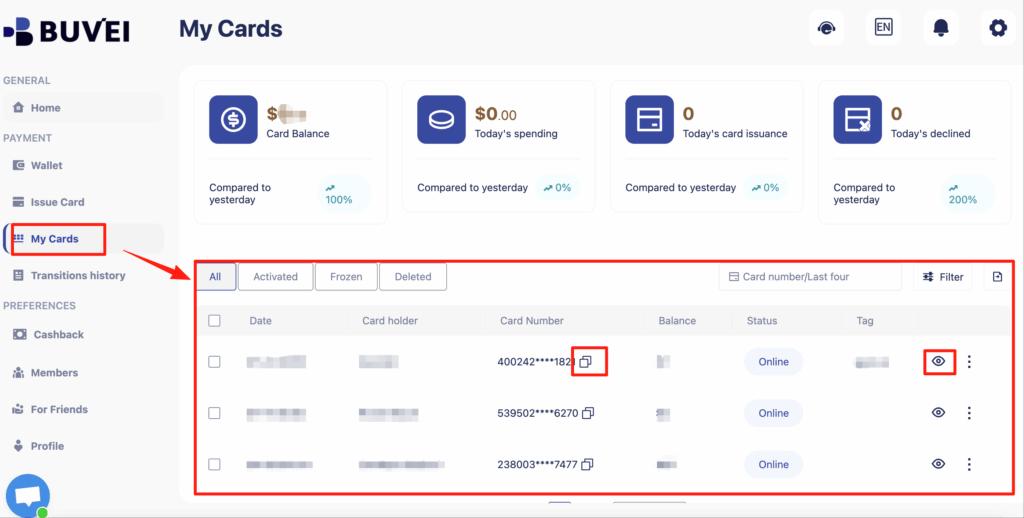
Head to My Cards to access:
-
Card number
-
Expiration date
-
CVV
-
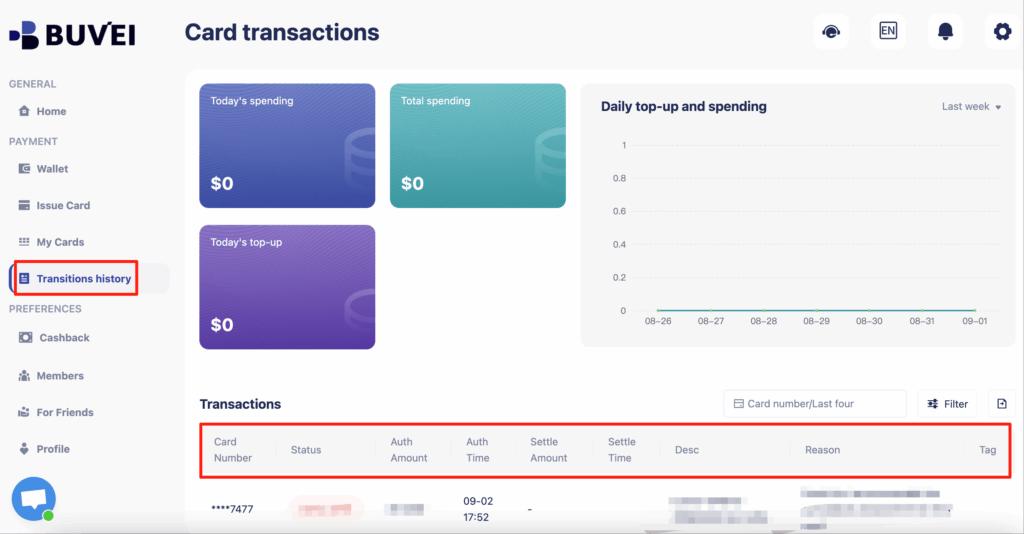
Transaction overview
-
Top-up history
-
Spending insights
From here, you can monitor activity and manage funding effortlessly.

Managing Card Limits and Security Settings
Creating a card is only the first step — proper configuration ensures long-term stability.
Set Smart Spending Limits
Align card balances with expected usage rather than overfunding.
Use Merchant-Specific Cards
Assign one card per vendor to isolate risk.
Monitor Transactions Frequently
Early detection prevents operational disruptions.
Freeze Unused Cards
Deactivate cards immediately when they are no longer needed.
Maintain Backup Cards
Critical services should never rely on a single payment method.
These practices mirror how mature finance teams manage digital payments.
Best Practices for Using Buvei Virtual Cards
To maximize performance and security, adopt a structured payment strategy.
✔ Name cards clearly by function
✔ Separate testing budgets from production spend
✔ Gradually increase limits as trust builds
✔ Avoid mixing personal and business expenses
✔ Review renewal dates for subscriptions
✔ Keep a funding buffer in your wallet
Well-organized payment infrastructure reduces friction and supports scalable growth.
Conclusion
Understanding how to create a virtual card using Buvei is a foundational step toward smarter financial operations. Virtual cards enhance security, improve budget control, and provide the flexibility required for modern digital payments.
With Buvei, you benefit from:
-
Instant card issuance
-
Multi-card management
-
Strong global payment compatibility
-
Transparent fees
-
Crypto-friendly funding
-
Advanced security standards
As online commerce accelerates, the organizations that modernize their payment systems will operate faster — and with fewer disruptions.