If you run ads on platforms like Google Ads, Meta Ads, TikTok Ads, or X Ads, you’ve probably encountered the same issue: campaigns scale quickly, bids adjust automatically, and your budget disappears faster than expected. Learning how to control daily ad spend is no longer optional—it’s a core skill for sustainable advertising.
One of the most effective solutions today is using virtual card limits. This guide explains why ad spend gets out of control, how virtual card limits work, and how to set them up step by step using Buvei.

Why Uncontrolled Ad Spend Is a Common Problem
Ad platforms are optimized to maximize delivery and performance, not to protect your cash flow.
Common reasons advertisers lose control of daily spend include:
-
Auto-bidding strategies overshooting targets
-
Budget caps applied at campaign level but not account level
-
Sudden traffic or auction spikes
-
Poor-performing creatives draining budget
-
Compromised ad accounts or misconfigured rules
When your payment method has no hard ceiling, ad platforms can continue charging until the balance is fully consumed. That’s why relying only on platform-side limits is risky.
How Virtual Card Limits Work for Ad Platforms
Virtual cards function like standard Visa or Mastercard cards, but with one critical difference: you control the limits externally.
With virtual card limits, you can:
-
Set a maximum balance per card
-
Control daily or monthly spending capacity
-
Assign one card per ad account or campaign
-
Instantly stop spend by pausing or emptying the card
From the ad platform’s perspective, nothing changes—it sees a normal card. For advertisers, however, this creates a powerful second layer of budget protection.
This makes virtual cards ideal for:
-
Agencies managing multiple client ad accounts
-
Teams running ads across several platforms
-
Solo advertisers who want hard spending guardrails
Benefits of Setting Daily and Monthly Limits
Using virtual cards for ad budget control offers clear operational advantages.
Key benefits include:
-
Preventing accidental overspend
-
Limiting losses if an account is compromised
-
Cleaner budget allocation across clients or projects
-
Easier reconciliation and reporting
-
Better discipline when scaling campaigns
-
Faster reaction when performance drops
Instead of trusting algorithms alone, you enforce limits at the payment level—where spending actually happens.
Creating Spend-Controlled Virtual Cards with Buvei
Buvei is designed for advertisers who need flexibility, speed, and strong cost control across multiple ad platforms.
Here’s how to get started.
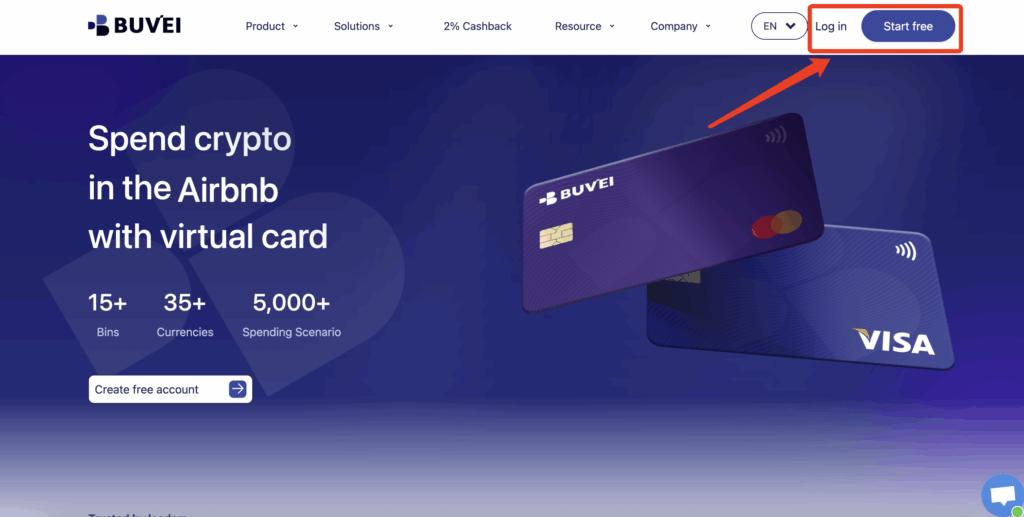
Step 1: Register a Buvei Account
Visit https://buvei.com and create a free account.
Complete email verification and log in to your dashboard.
Step 2: Fund Your Wallet
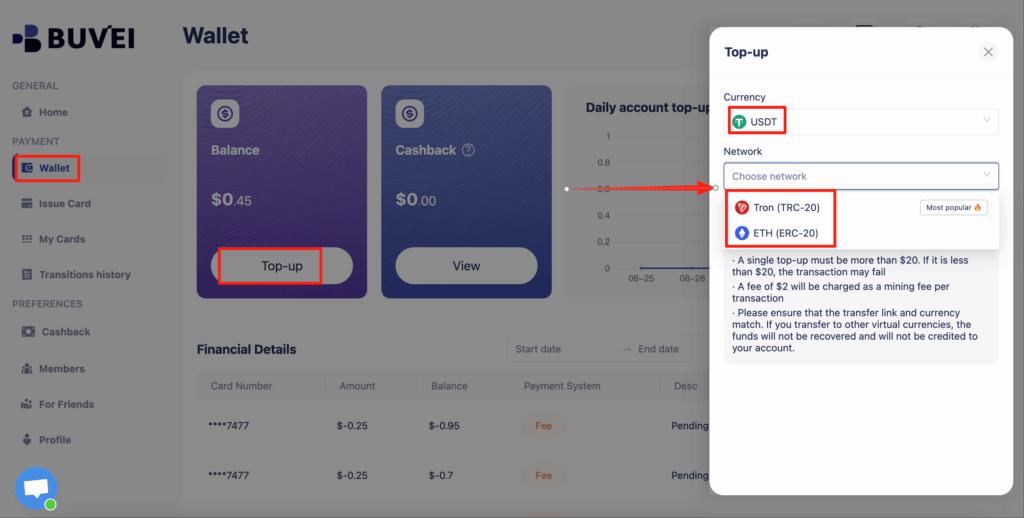
Go to the Wallet tab and top up using supported stablecoins:
-
USDT (TRC20)
-
USDT (ERC20)
Buvei provides a dedicated deposit address. Once the transaction is confirmed on-chain, your balance becomes available instantly.
Step 3: Create a Virtual Card
Navigate to the Cards tab:
-
Select your preferred BIN region (US BIN recommended for ad platforms)
-
Choose card type
-
Click Issue Card

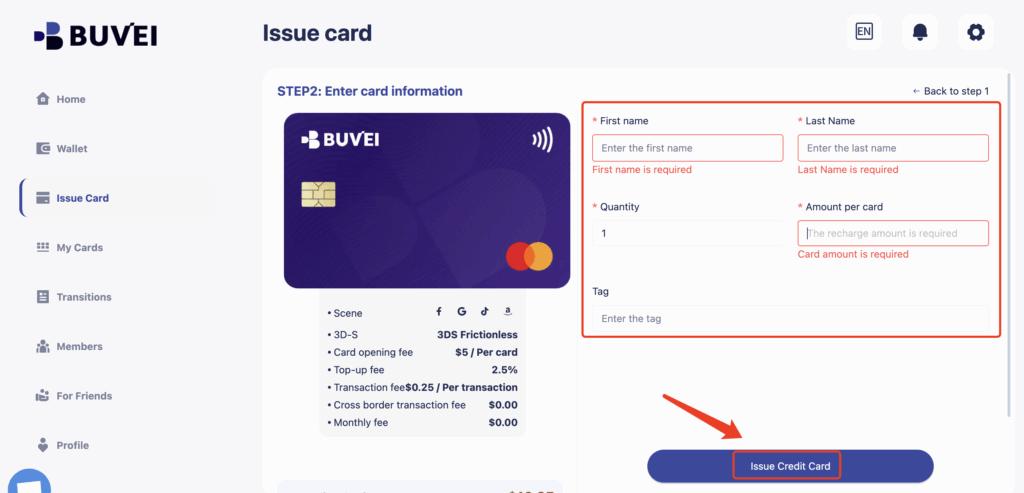
Enter the card name, initial amount, and number of cards, then click Create Card.
You’ll immediately see:
-
Card number
-
Expiration date
-
CVV
-
Transaction history
-
Card balance and usage
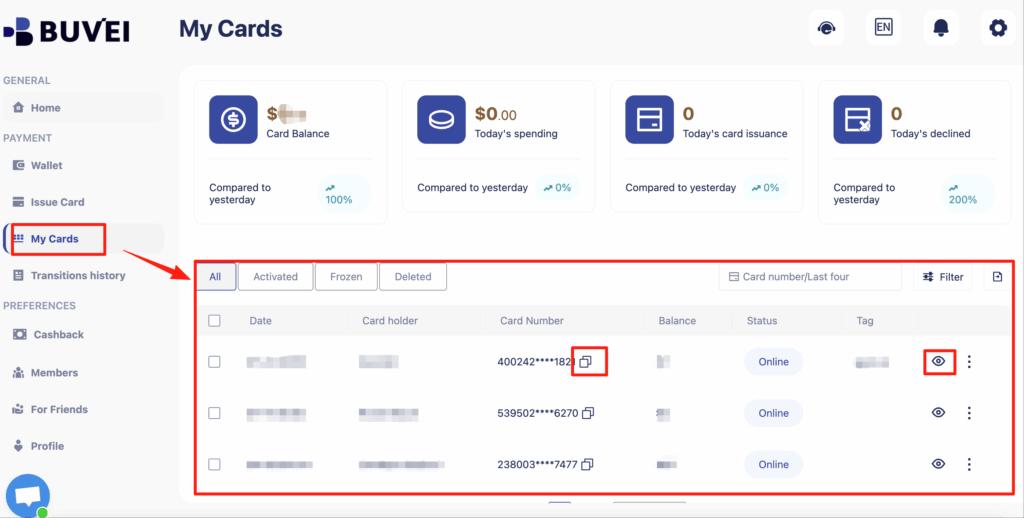
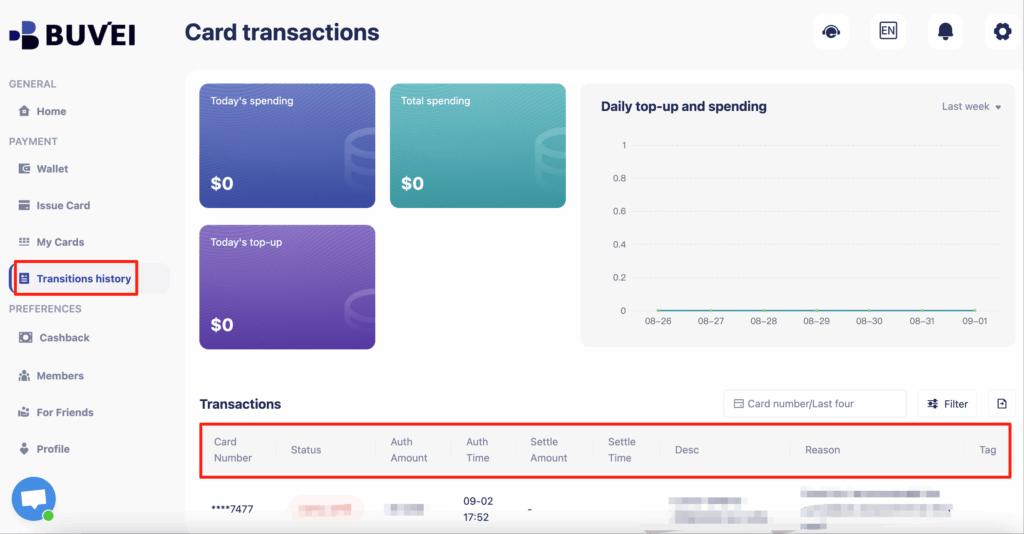
This structure makes Buvei virtual cards highly effective for controlling daily ad spend.
Step-by-Step: Assigning Limits to Ad Accounts
To control spend precisely, follow this structure:
-
Create one virtual card per ad account
-
Fund each card with a fixed daily or weekly budget
-
Attach the card to the ad account billing section
-
Monitor spend through Buvei’s transaction logs
-
Refill only after reviewing performance
If spend exceeds expectations, the card balance acts as a hard stop—no additional charges go through.
Best Practices for Scaling Ads Safely
Once your payment structure is in place, scaling becomes far more predictable.
Experienced advertisers follow these rules:
-
Start new campaigns with low card balances
-
Increase funding gradually based on performance
-
Never reuse one card across too many accounts
-
Review transaction logs weekly
-
Separate client cards from internal test campaigns
-
Keep backup cards ready for continuity
Buvei supports these workflows with:
-
Multi-card management from one account
-
Real-time transaction visibility
-
Transparent fees
-
Fast card creation
-
Responsive online support
This allows advertisers to scale with confidence instead of reacting to budget surprises.

Final Thoughts
Learning how to control daily ad spend with virtual card limits is one of the most practical upgrades any advertiser can make.
Instead of relying solely on ad platform settings, virtual cards give you:
-
External budget enforcement
-
Better risk management
-
Cleaner financial operations
-
More predictable scaling
With a structured setup using Buvei, advertisers gain real control over spending—without sacrificing flexibility or performance.