
If you’re running campaigns on X (formerly Twitter), few things are more frustrating than encountering X Ads billing errors. A failed payment can pause campaigns, reduce account trust, and in some cases even trigger ad account suspension.
Fortunately, most billing problems can be fixed once you understand why they happen—and how to structure your payment setup correctly. This guide breaks down common issues and shows how to fix X Ads payment issues using a reliable virtual card solution.

Common X Ads Billing Error Messages
Advertisers frequently encounter messages such as:
-
“Payment failed”
-
“Billing error – update payment method”
-
“Your account is temporarily restricted due to billing issues”
-
“Transaction declined by issuer”
-
“Card verification failed”
While these look generic, they often point to deeper risk signals within X’s billing system.
X Ads uses automated risk detection similar to Meta and Google Ads. If your payment method looks unstable, high-risk, or inconsistent, the platform may start rejecting transactions—even if your balance is sufficient.
Why X Ads Payments Get Declined or Blocked
The most common causes of X Ads payment declined issues include:
-
Low-quality card BIN regions
-
Recycled or overused virtual cards
-
Mismatch between billing country and card region
-
Frequent failed authorization attempts
-
Unstable prepaid cards
-
Insufficient balance during auto-charge
-
High-risk issuing banks
Once an account is flagged, simply “trying again” often makes the situation worse. Instead, you need a cleaner payment structure.
How Payment Issues Affect Ad Account Stability
Billing reliability directly impacts your ad account health.
Repeated X Ads billing failed events can lead to:
-
Campaign pauses during critical periods
-
Spending limits being reduced
-
Manual reviews of your ad account
-
Account-level restrictions
-
Permanent suspension in extreme cases
For agencies and performance marketers, payment stability isn’t just about convenience—it’s about protecting the longevity of the entire ad asset.
Using Virtual Cards to Fix X Ads Billing Errors
Many professional advertisers now rely on structured X Ads virtual card payment setups instead of random prepaid cards.
A high-quality virtual card solution offers:
-
Strong BIN reputation (e.g., US BIN)
-
Consistent issuer behavior
-
Clean authorization history
-
Custom spend limits
-
Multiple cards for account segmentation
Buvei is designed for these use cases, supporting advertisers who need stable cards for platforms like X Ads, Google Ads, Meta Ads, TikTok Ads, and SaaS tools.
How to Create a Virtual Card with Buvei
To stabilize your billing, you first need a reliable card setup.
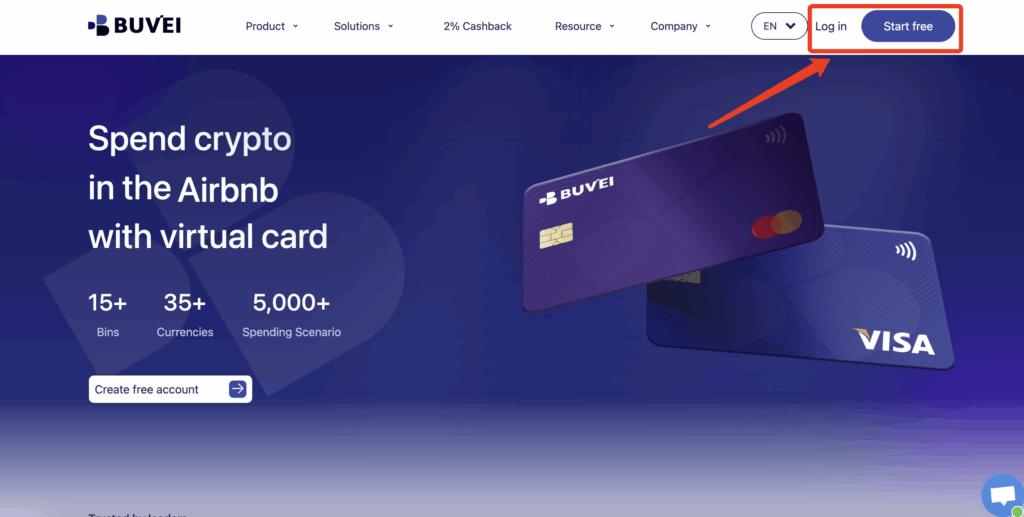
Step 1: Register a Buvei Account
Visit https://buvei.com and create a free account.
After email verification, log in to your Buvei dashboard.
Step 2: Fund Your Account
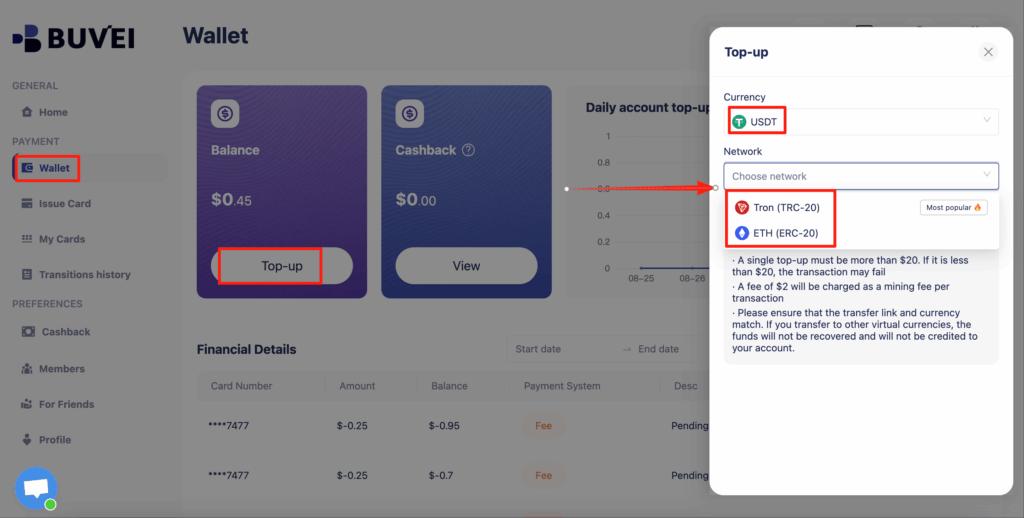
Go to the Wallet tab and top up using supported stablecoins:
-
USDT (TRC20)
-
USDT (ERC20)
You will receive a dedicated deposit address. Once confirmed, your balance will appear and be ready to use.
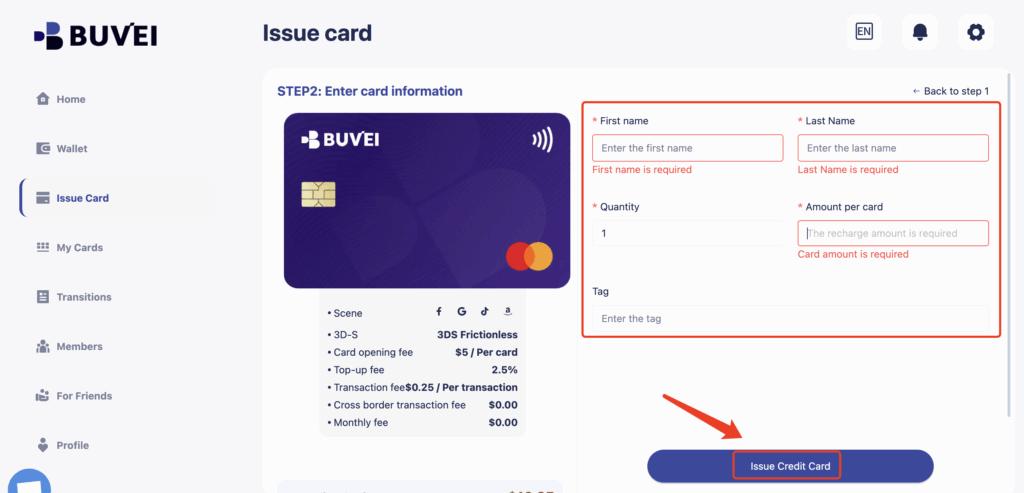
Step 3: Create Your Virtual Card
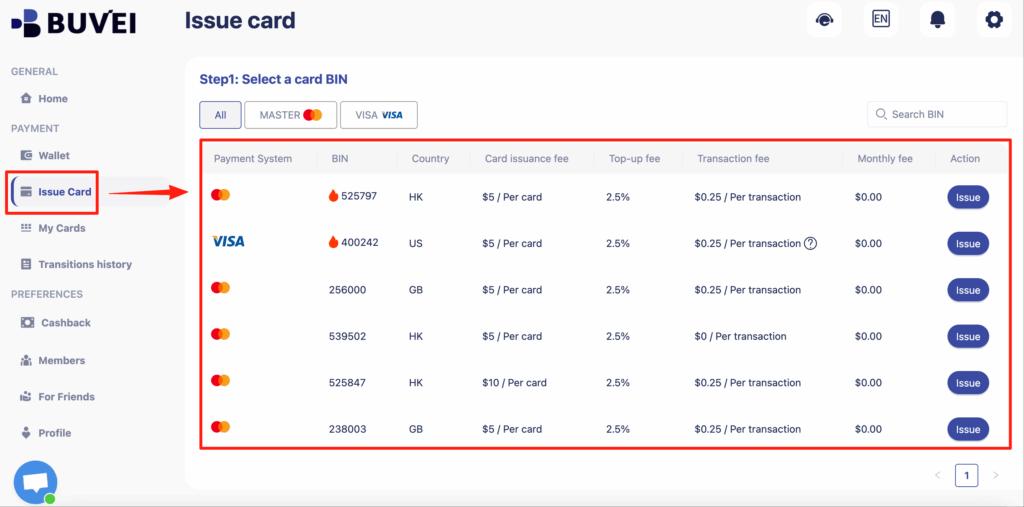
Navigate to the Cards tab:
-
Select your preferred BIN region (US BIN recommended for X Ads)
-
Choose card type
-
Click Issue Card
-
Fill in card name, amount, and number of cards
-
Click Create Card
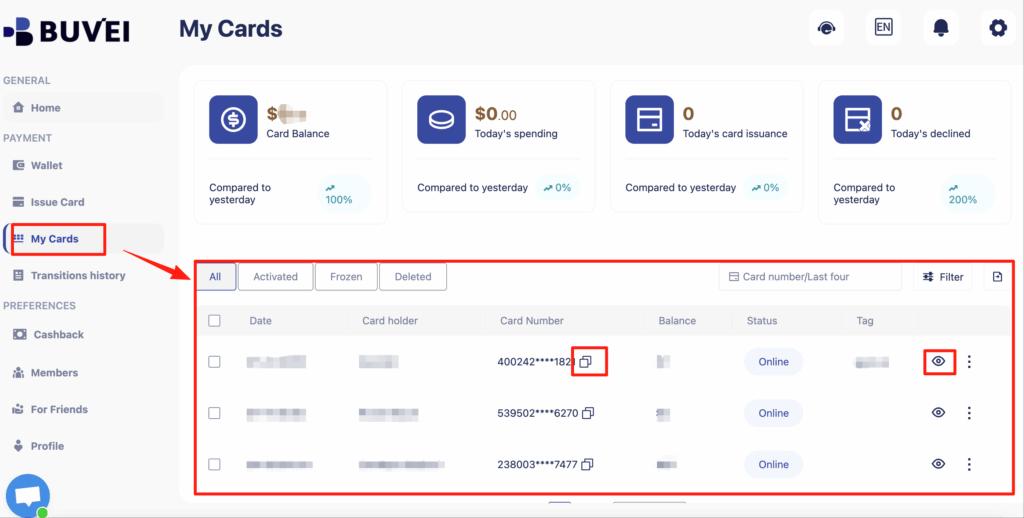
You can then view:
-
Card number
-
Expiry date
-
CVV
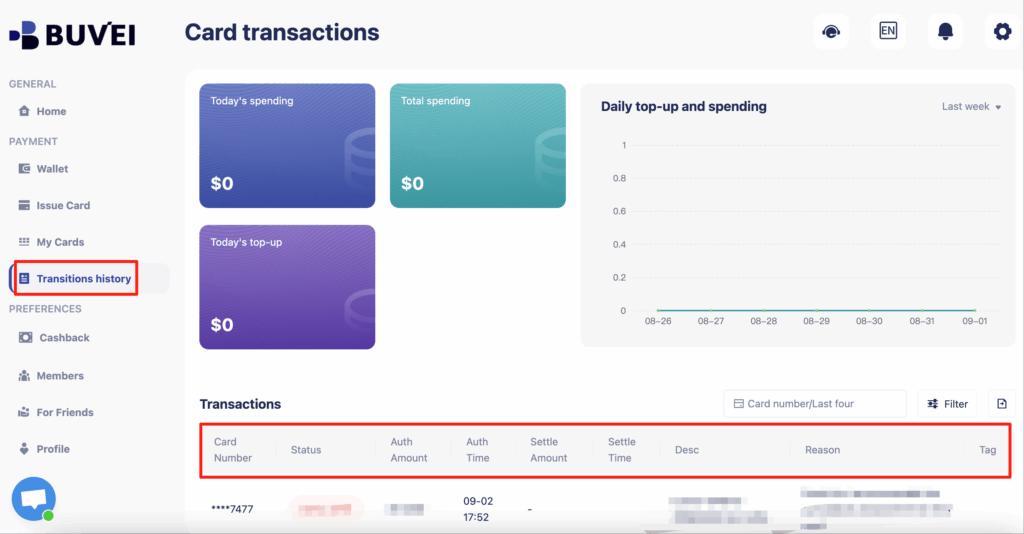
-
Full transaction history
-
Spending overview
This setup is ideal for advertisers who need a stable Buvei virtual card for X Ads.
How to Prevent Future Billing Failures
Fixing today’s issue is important—but preventing future issues is where professionals win.
Best practices include:
-
Use one dedicated card per ad account
-
Keep sufficient balance to cover auto-charges
-
Avoid frequent card changes
-
Do not repeatedly retry after a decline
-
Monitor transactions weekly
-
Set spending limits to control risk
Buvei supports this workflow with:
-
Multi-card management
-
Custom card limits
-
Transparent fees
-
Real-time transaction monitoring
-
Responsive online customer support
This makes it easier to build long-term stability instead of constantly reacting to new X Ads billing errors.

Final Thoughts
Billing issues on X Ads are rarely random. They’re usually signals that your payment structure needs improvement.
By switching to a reliable setup and using a properly managed virtual card, most advertisers can quickly fix X Ads payment issues, reduce declines, and protect their ad accounts from unnecessary risk.
For marketers who value stability, scalability, and control, a structured virtual card solution like Buvei offers a practical path forward.