Running ads on X (formerly Twitter) requires a stable and compliant payment method. As advertisers scale campaigns or manage multiple ad accounts, billing issues such as payment failures, account reviews, or sudden suspensions become increasingly common. This is why many advertisers choose virtual cards to manage X Ads billing more safely and flexibly.
This guide explains how X Ads billing works, why virtual cards are widely used, and how to set up and manage multiple virtual cards with Buvei.

X Ads Billing Rules & Common Payment Issues
X Ads uses automated billing systems designed to detect fraud, unusual spending behavior, and payment inconsistencies. Common billing rules include:
-
Ads are billed automatically based on spend thresholds
-
Cards must support online recurring payments
-
Failed payments can trigger account reviews or ad pauses
-
Repeated billing errors may result in temporary or permanent suspension
Advertisers often encounter issues such as:
-
Card declines during campaign scaling
-
Billing retries failing after an initial decline
-
Accounts being paused due to payment verification problems
-
Cards being blocked after multiple ad accounts share the same payment method
Why Advertisers Use Virtual Cards for X Ads
Virtual cards provide better control and risk isolation compared to traditional credit cards. Advertisers use them for X Ads because they allow:
-
Separation of payments across multiple ad accounts
-
Reduced risk if one card gets flagged or blocked
-
Easier replacement than bank-issued cards
-
Precise control over ad spend limits
-
Cleaner accounting and reconciliation
By assigning one virtual card per X Ads account, advertisers can prevent payment issues on one account from affecting others.
How to Create Multiple Virtual Cards with Buvei
Buvei makes it easy to issue multiple virtual cards from a single account, which is ideal for advertisers managing multiple campaigns or clients.
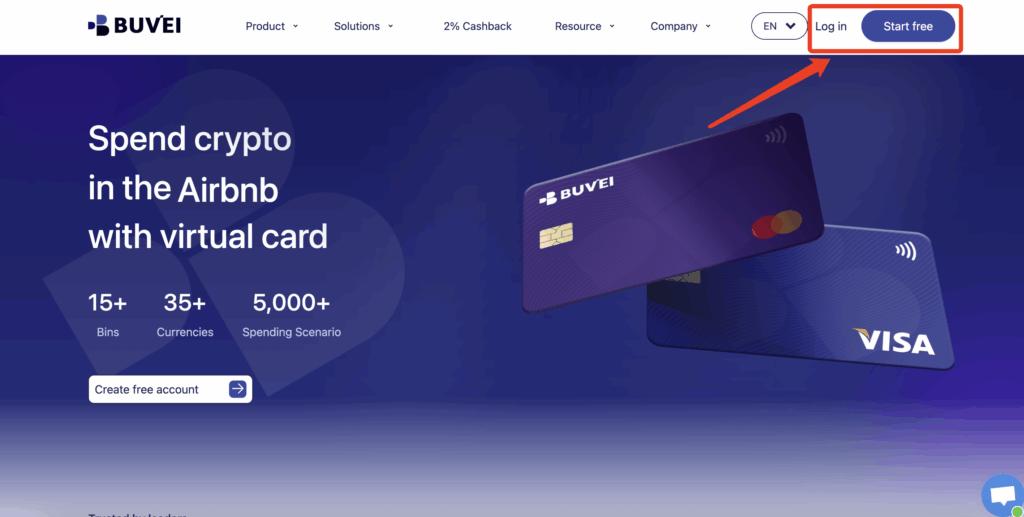
Step 1: Register a Buvei Account
Visit https://buvei.com and create a free account.
After email verification, log in to access the Buvei dashboard.
Step 2: Fund Your Buvei Wallet
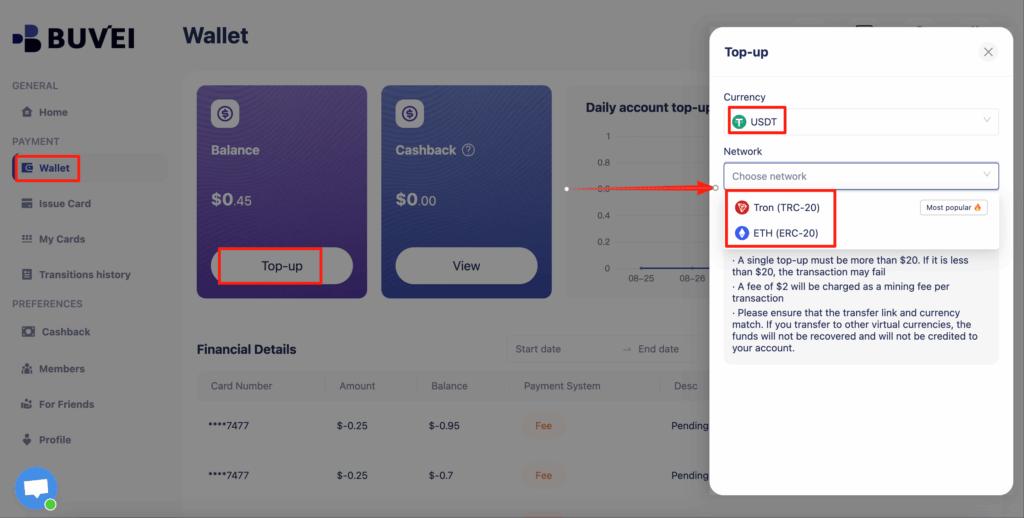
Go to the Wallet section and choose a supported stablecoin such as USDT (TRC20 or ERC20).
Buvei will generate a unique deposit address.
Once the transaction is confirmed on-chain, your balance will be available immediately.
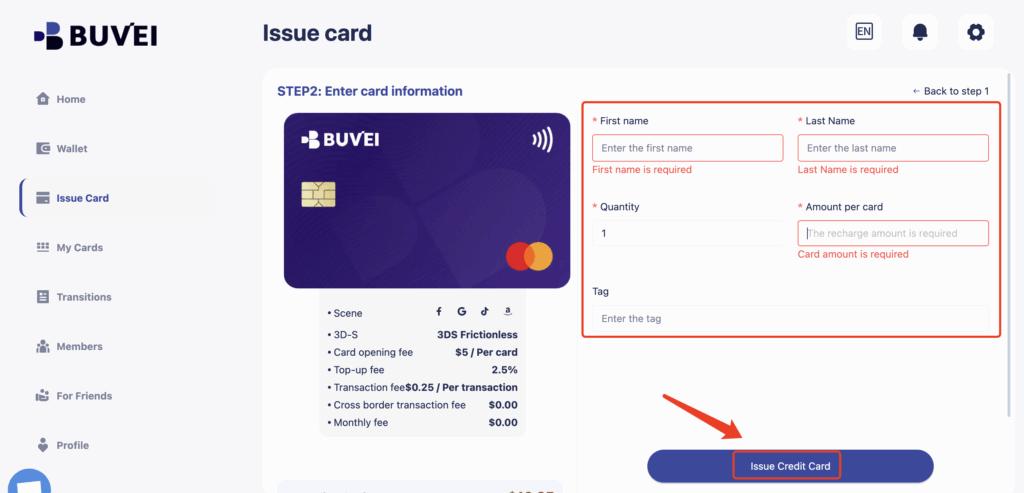
Step 3: Create Virtual Cards
Navigate to the Cards section and click Create Card.
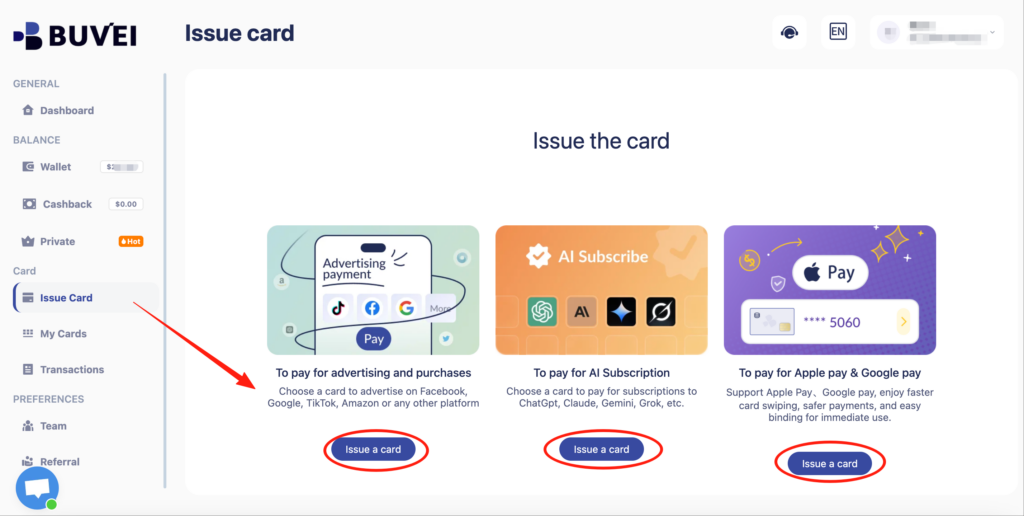

You can:
-
Select a preferred BIN region (US BINs are commonly used for ad platforms)
-
Choose the card type
-
Set card name, balance, and quantity
-
Issue multiple cards for different X Ads accounts
All issued cards appear under My Cards for easy management.
Step 4: Add the Card to Your Cloud Account
Use the Buvei virtual card details to complete the payment setup on your chosen cloud platform.
If an ad account receives warnings, payment retries, or early restrictions:
-
Stop using the existing card
-
Issue a new virtual card
-
Attach it only after resolving policy issues
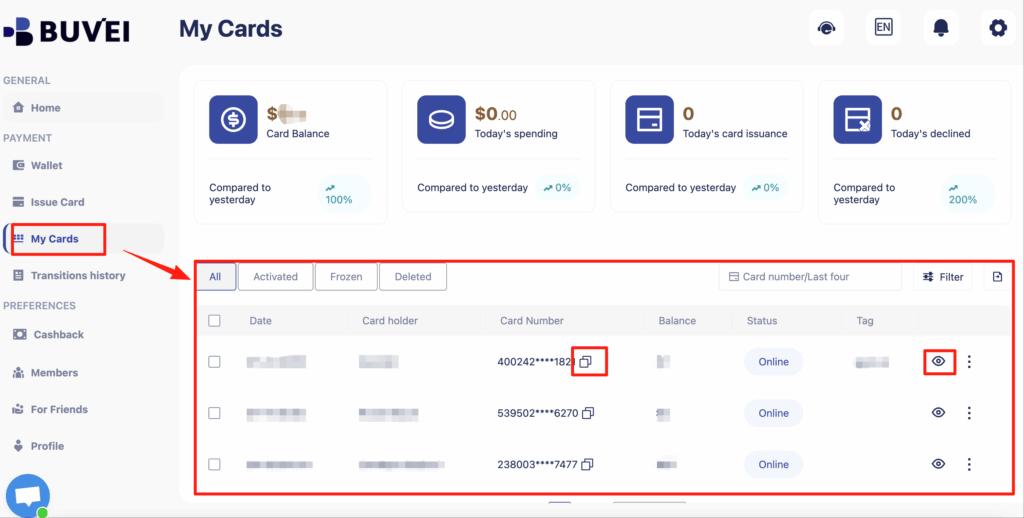
From My Cards, affiliates can monitor balances, spending activity, and transaction history—making it easier to spot early warning signs.
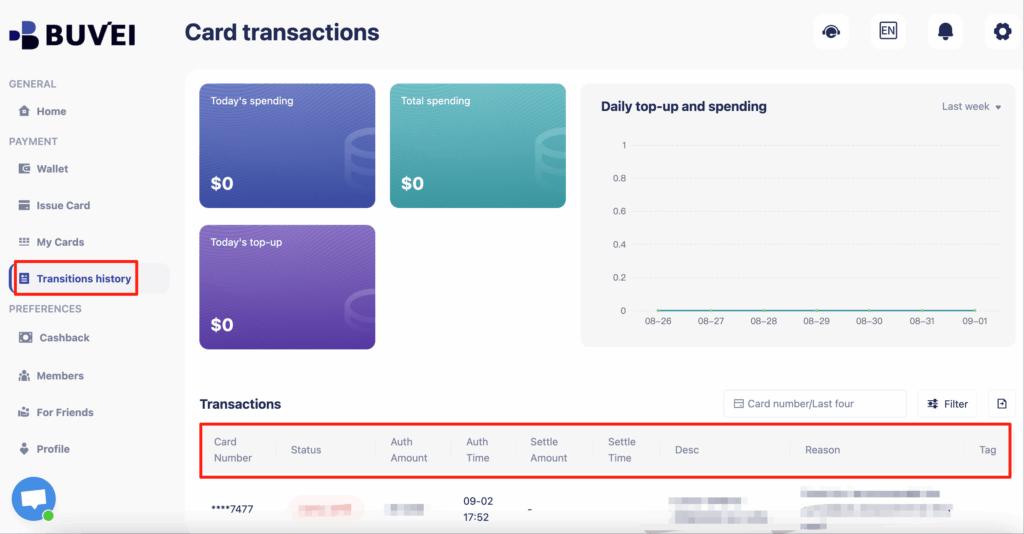
Buvei supports issuing multiple cards quickly, making it easy to match payment structure to campaign structure.
Step-by-Step: Adding Virtual Cards to X Ads Accounts
After creating your virtual card:
-
Log in to your X Ads Manager
-
Go to Billing > Payment Methods
-
Select Add new card
-
Enter your virtual card details:
-
Card number
-
Expiration date
-
CVV
-
-
Save the payment method
Once added, the card will be charged automatically as your ads run.
Setting Spend Limits to Protect Ad Accounts
One of the biggest advantages of virtual cards is spend control. With Buvei virtual cards, advertisers can:
-
Allocate a fixed balance per ad account
-
Limit exposure if campaigns overspend
-
Prevent unexpected charges during testing phases
-
Match card balances with daily or monthly ad budgets
This approach helps protect ad accounts from sudden billing spikes that may trigger reviews or suspensions.
Avoiding Billing Suspensions
To reduce the risk of billing-related suspensions on X Ads:
-
Avoid sharing the same card across many ad accounts
-
Keep sufficient balance before billing thresholds are reached
-
Replace declined cards instead of retrying repeatedly
-
Monitor card expiration dates
-
Use dedicated cards for each account or campaign
If a card is flagged, issuing a new virtual card is often faster than attempting to resolve repeated payment failures.

Final Thoughts
X Ads billing stability plays a critical role in keeping campaigns live and accounts active. Virtual cards offer advertisers greater flexibility, clearer spend control, and improved risk isolation compared to traditional cards.
With Buvei virtual cards, advertisers can easily create and manage multiple cards, fund them with crypto, and protect their X Ads accounts from common billing issues. For teams, agencies, and individual advertisers, virtual cards are a practical solution for safer X Ads billing.