Mobile apps, in-app purchases, and subscriptions are now a core part of daily digital spending. However, many users experience payment failures on the Apple App Store and Google Play, especially when using local bank cards or managing multiple subscriptions.
This guide explains why payments fail on app stores, why traditional cards are often unreliable, and how virtual cards—especially Buvei virtual cards—can be used safely and effectively for App Store and Google Play payments. 
Common Payment Issues on App Store and Google Play
Both Apple and Google use strict payment verification systems designed to reduce fraud and unauthorized purchases. As a result, users frequently encounter issues such as:
-
Card declined during app purchase or subscription renewal
-
Payment method rejected without a clear explanation
-
Repeated verification requests
-
Subscription cancellations due to failed renewals
-
Temporary account or payment method blocks
These issues are especially common for users paying from regions with stricter banking controls or limited international card support.
Why Traditional Cards Often Fail for Digital Stores
Traditional debit and credit cards may fail on app stores for several reasons:
-
Local bank cards are blocked for international digital services
-
Cards do not support recurring or subscription billing
-
Bank-side fraud filters flag app store transactions
-
Card BIN country conflicts with Apple ID or Google account region
-
Low authorization limits that fail during renewals or tax adjustments
Even cards that work once may fail later, causing unexpected subscription interruptions.
Benefits of Using Virtual Cards for App Purchases
Virtual cards provide more control and flexibility when paying for apps, games, and subscriptions.
Key benefits include:
-
Improved security by keeping your main bank card private
-
Easier control over subscription spending
-
Faster replacement if a card fails or expires
-
Separation of app store spending from other expenses
-
Reduced risk of unwanted or forgotten renewals
For users with multiple subscriptions, virtual cards make digital spending easier to manage.
Step-by-Step: Paying with Virtual Cards on App Stores
Using a virtual card on the App Store or Google Play follows the same process as a physical card.
For Apple App Store:
-
Log in to your Apple ID
-
Go to Payment & Shipping
-
Add a new payment method
-
Select Credit or Debit Card
-
Enter your virtual card details
-
Save and confirm
For Google Play:
-
Open Google Play
-
Go to Payments & subscriptions
-
Add a new payment method
-
Enter your virtual card information
-
Set it as the default payment option
Make sure your virtual card has enough balance to cover subscriptions, taxes, and renewals.
How to Use Buvei Virtual Cards for App Store & Google Play
Buvei offers a simple way to create and manage virtual cards suitable for app store payments.
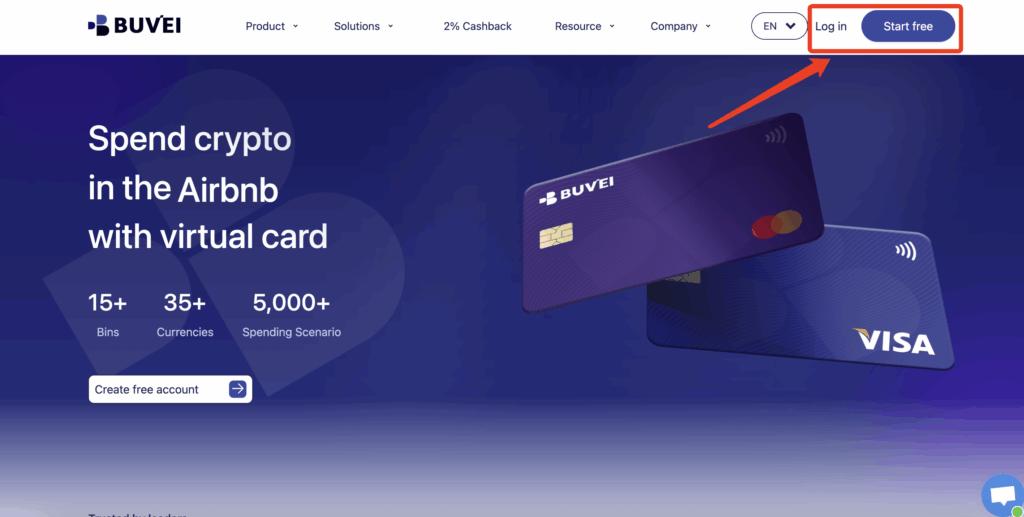
Step 1: Register a Buvei Account
-
Visit https://buvei.com
-
Create a free account
-
Complete email verification
-
Log in to access the Buvei dashboard
Step 2: Fund Your Buvei Wallet
-
Navigate to the Wallet section
-
Choose USDT (TRC20 or ERC20) as your funding method
-
Copy the unique deposit address provided
-
Send your funds to that address
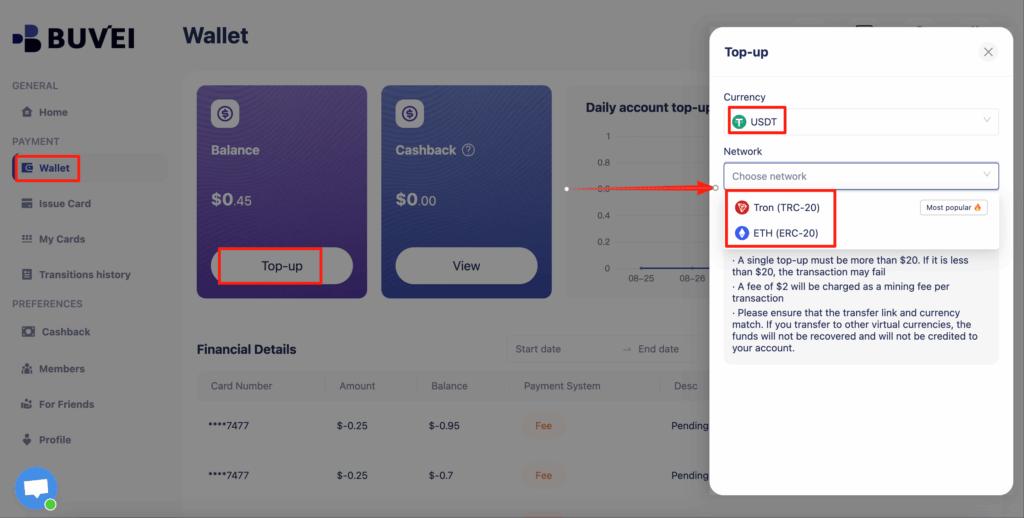
Once confirmed on-chain, your balance appears instantly and is ready to use.
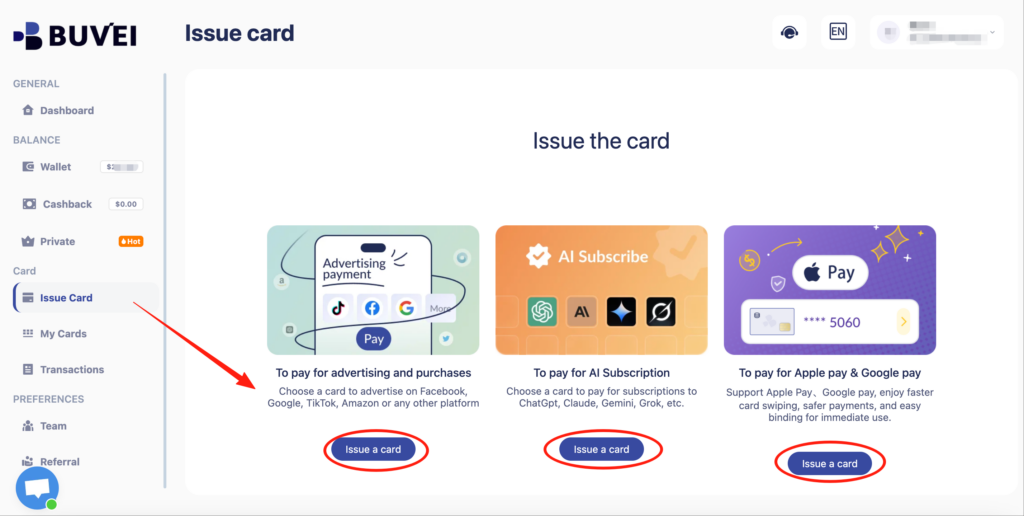
Step 3: Create a Virtual Card
-
Go to Cards → Create Card
-
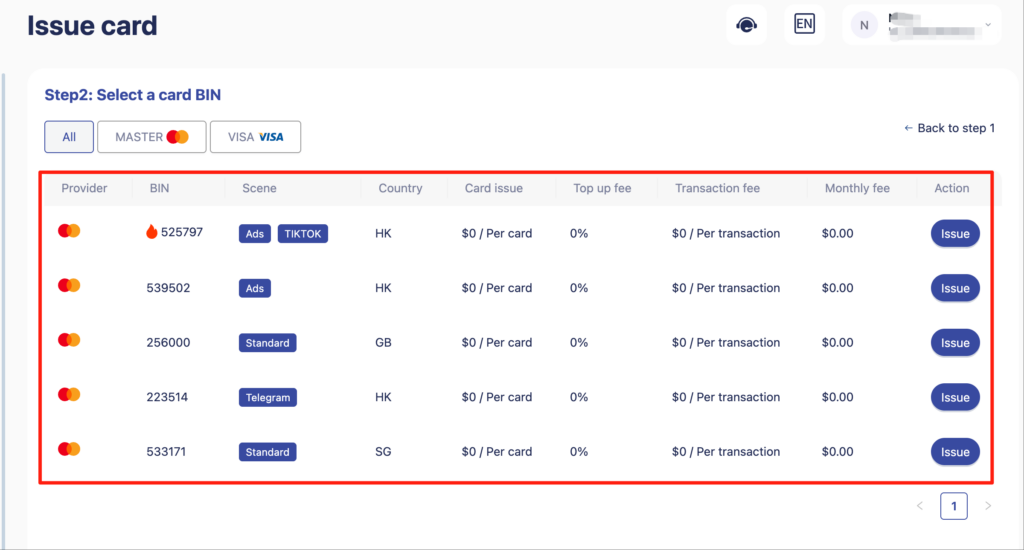
Select:
-
Preferred BIN region (US BIN recommended for app stores)
-
Card type (Visa or Mastercard)
-
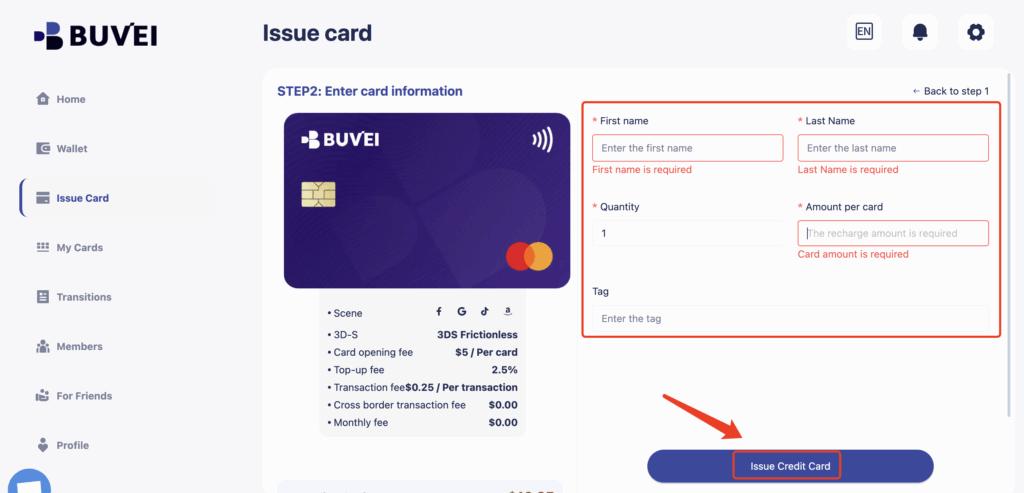
Card balance based on expected spending
-
-
Click Issue Card
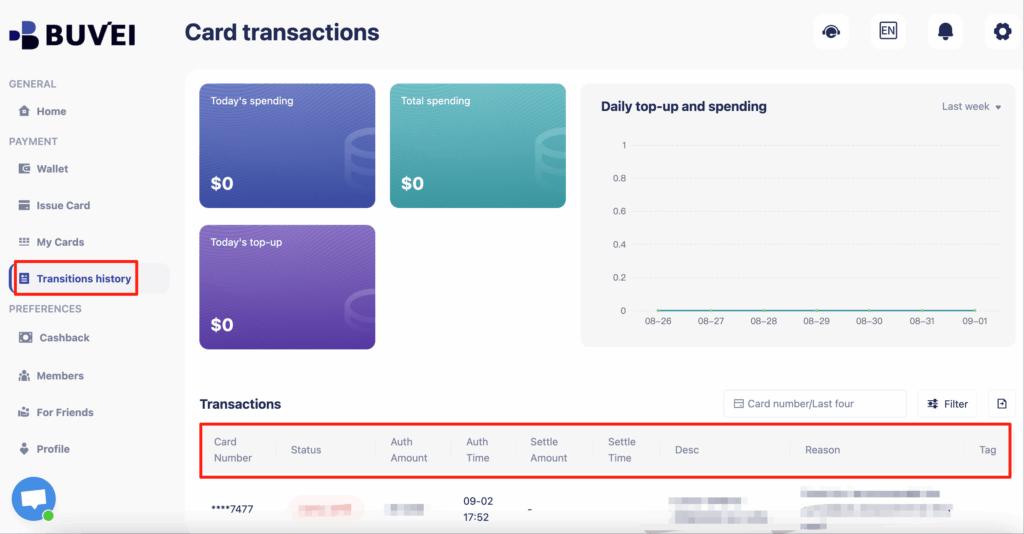
After issuance, open My Cards to view your card number, expiration date, CVV, and current balance. From this page, you can also monitor spending, top-ups, and full transaction history.
Step 4: Add the Card to App Store or Google Play
Use the Buvei virtual card details to complete the payment setup on your Apple ID or Google Play account.
If an ad account receives warnings, payment retries, or early restrictions:
-
Stop using the existing card
-
Issue a new virtual card
-
Attach it only after resolving policy issues
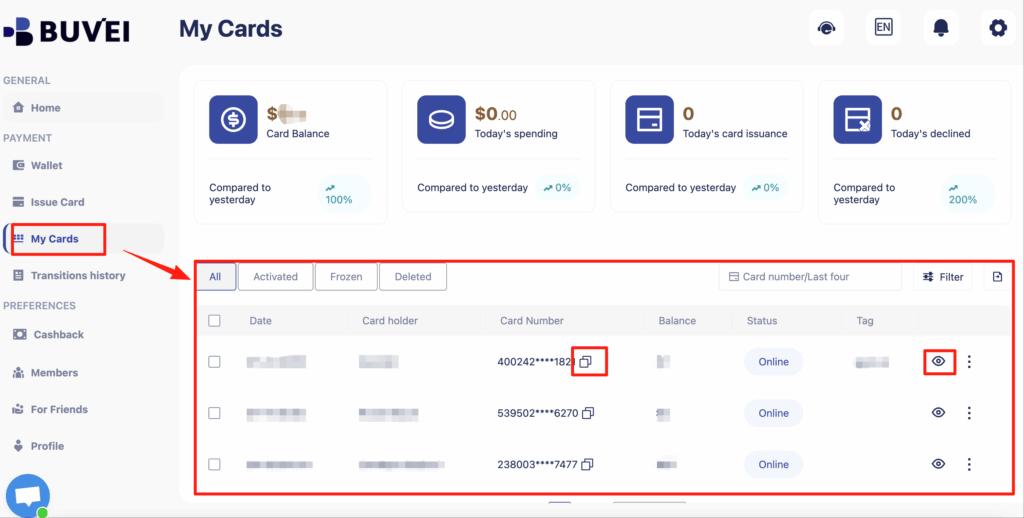
From My Cards, affiliates can monitor balances, spending activity, and transaction history—making it easier to spot early warning signs.
Tips for Managing Subscriptions and Renewals
To avoid interruptions and unexpected charges, follow these best practices:
-
Use a dedicated virtual card for app subscriptions
-
Keep a small balance buffer for renewals and taxes
-
Monitor expiration dates regularly
-
Replace cards proactively if a renewal fails
-
Review active subscriptions monthly
Virtual cards make it easier to stop spending simply by not refilling the card.
Final Thoughts
App Store and Google Play payments can be frustrating when traditional cards fail or subscriptions renew unexpectedly. Virtual cards offer a safer, more flexible alternative for managing digital purchases and recurring app payments.
With Buvei virtual cards, you can fund accounts using stablecoins, issue app-compatible cards quickly, and manage all app store spending from one dashboard. For users who value control, security, and reliability, virtual cards are a smart solution for App Store and Google Play payments.