
Telegram Premium unlocks faster downloads, exclusive stickers, and advanced features.
However, paying for Telegram Premium in 2026 is not always straightforward, especially when using virtual cards.
Many users encounter sudden declines, failed renewals, or “payment not accepted” messages—even when the card works elsewhere. In most cases, the issue lies in how Telegram handles subscription billing.
This guide explains how Telegram Premium processes payments, why virtual cards get declined, and how to successfully subscribe using a Buvei virtual card, step by step.
How Telegram Premium Handles Card Payments
Telegram Premium uses a subscription-based billing system, which is stricter than one-time purchases.
Recurring Subscription Model
Telegram Premium charges:
-
Monthly or yearly
-
Automatically, without manual confirmation
This means the card must support:
-
Recurring charges
-
Authorization checks
-
Automatic retries
Cards that only allow one-time payments often fail.
Ongoing Risk and Verification Checks
Telegram may:
-
Run small authorization holds
-
Retry failed payments
-
Apply region-based fraud rules
These checks continue throughout the subscription lifecycle, not just during signup.
Why Virtual Cards Get Declined on Telegram Premium
Virtual cards are declined for predictable reasons.
Recurring Payments Are Not Supported
Some virtual cards:
-
Block subscriptions by default
-
Allow only single transactions
Telegram Premium requires recurring billing support.
Authorization Holds Are Rejected
Telegram may temporarily reserve a small amount to verify future charges.
If the card:
-
Rejects pre-authorizations
-
Requires exact transaction amounts
the payment setup fails.
Balance Is Too Tight
Even if the first payment succeeds:
-
Renewals may fail due to insufficient buffer
-
Currency conversion can cause small differences
Telegram does not always warn before canceling access.
Using Buvei Virtual Cards for Telegram Premium
Users who want stable Telegram Premium billing often choose Buvei virtual cards, which are built for platform subscriptions.
Why Buvei Works Well With Telegram Premium
Buvei virtual cards offer:
-
Visa and Mastercard support
-
Stable BIN regions
-
Authorization hold compatibility
-
Reliable recurring payments
They are commonly used for:
-
SaaS subscriptions
-
Digital tools
-
Messaging and content platforms
Step-by-Step: How to Pay for Telegram Premium With Buvei
Follow this exact setup to reduce declines.
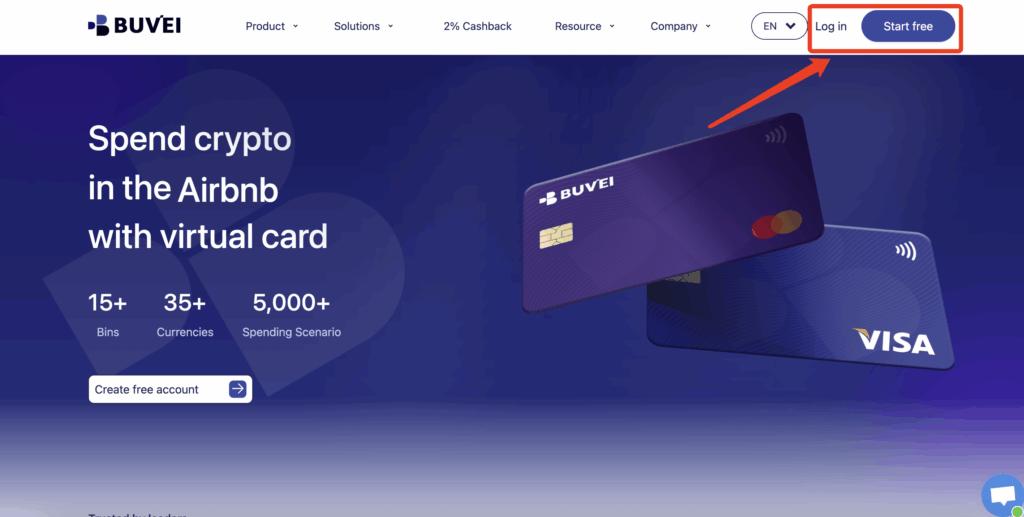
Step 1: Register a Buvei Account
-
Visit https://buvei.com
-
Create a free account
-
Complete email verification
-
Log in to the Buvei dashboard
No complex KYC or waiting period is required.
Step 2: Top Up Your Account With USDT
-
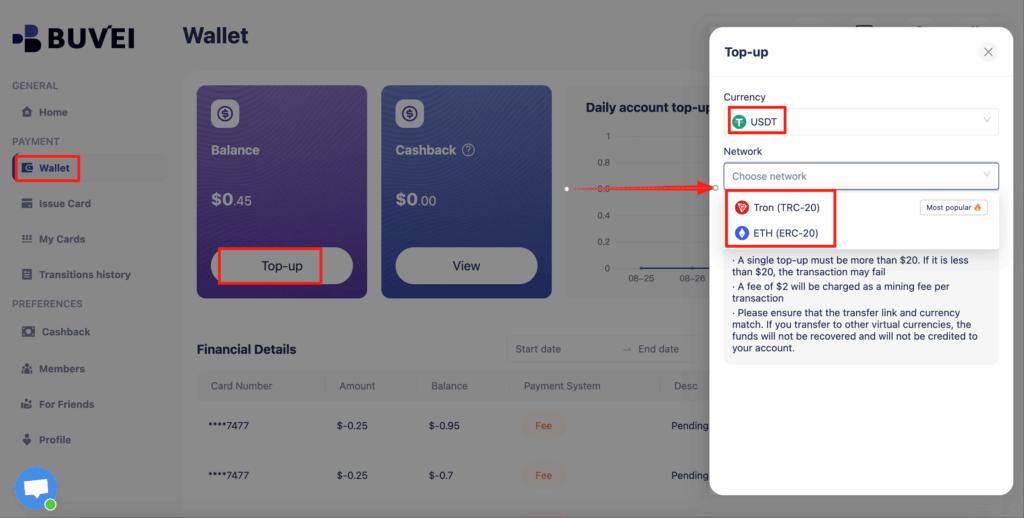
Go to the Wallet tab
-
Select USDT (TRC20 or ERC20)
-
Copy your unique deposit address
-
Send USDT from your wallet
Once confirmed, your balance is available immediately.
Step 3: Create a Virtual Card
-
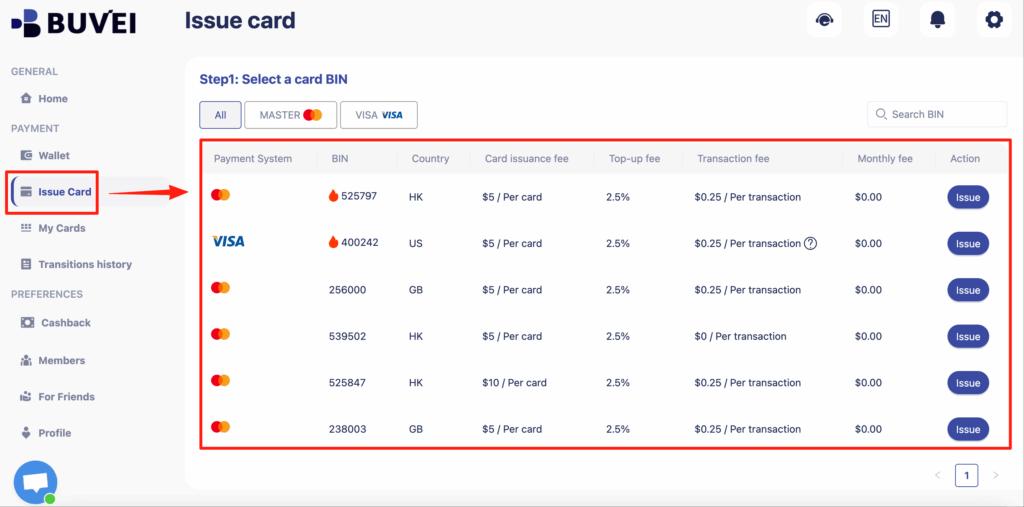
Open the Cards tab
-
Select a BIN region
-
U.S. BINs are generally recommended
-
-
Choose the card type
-
Click Issue Card
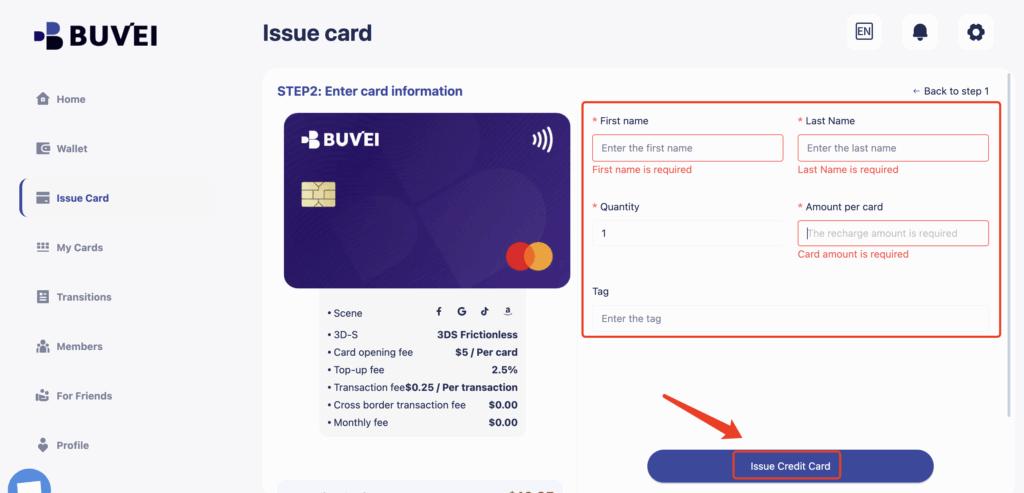
Enter:
-
-
Card name (e.g., “Telegram Premium”)
-
Initial funding amount
-
Card quantity
-
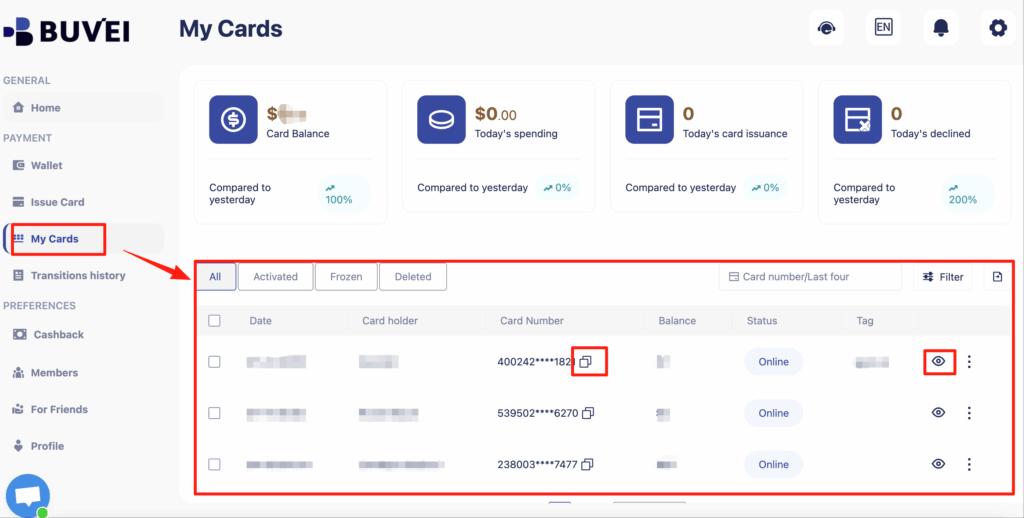
After creation, go to My Cards to view:
-
Card number
-
Expiration date
-
CVV
-
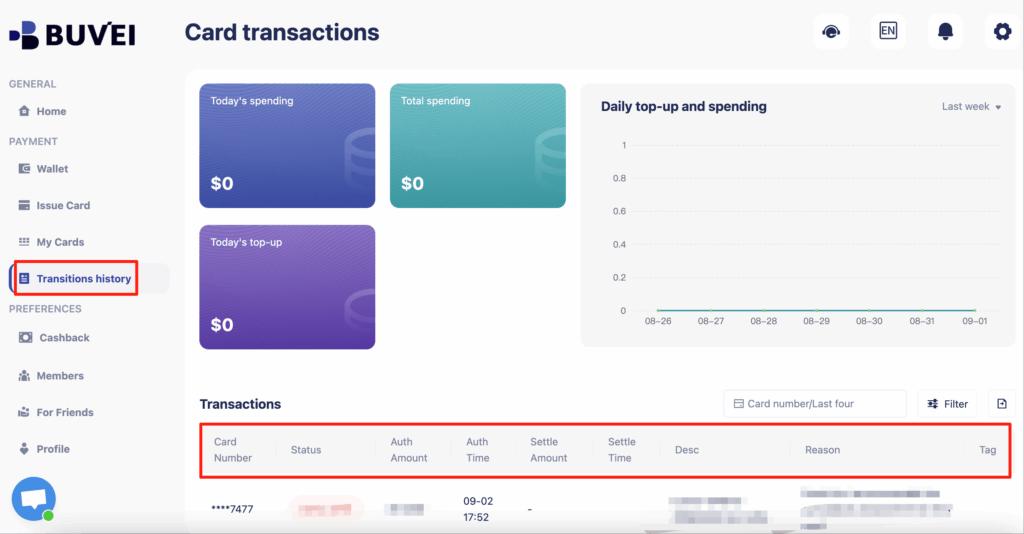
Transaction history
All transactions can be tracked from this page.
Step 4: Add the Card to Telegram Premium
-
Open Telegram
-
Go to Settings → Telegram Premium
-
Choose a subscription plan
-
Enter your Buvei virtual card details
-
Confirm the payment
Telegram may place a small verification charge before activation.
Tips for Smooth Renewals in 2026
A few simple settings can prevent most issues.
Keep a Balance Buffer
Maintain:
-
At least 20–30% more than the subscription price
This covers:
-
Authorization checks
-
Currency conversion differences
Use One Card Per Subscription
Avoid using the same card for:
-
Multiple subscriptions
-
Advertising platforms
Dedicated cards behave more consistently.
Avoid Frequent Card Changes
Changing cards too often can:
-
Trigger risk flags
-
Interrupt renewals
Consistency matters.

What to Do If Telegram Premium Payment Fails
If Telegram declines your payment:
Immediate Actions
-
Do not retry repeatedly
-
Check balance and limits
-
Wait a few minutes before retrying
Long-Term Fix
-
Create a new dedicated virtual card
-
Increase the card limit
-
Ensure recurring payments are enabled
Most users resolve issues once billing becomes stable.
Final Thoughts
Telegram Premium payment failures in 2026 are rarely random.
They are usually caused by:
-
Cards that don’t support recurring billing
-
Rejected authorization holds
-
Insufficient balance buffers
By using a subscription-friendly virtual card like Buvei, users can avoid interruptions and keep Telegram Premium active without constant payment issues.
For subscriptions, payment stability is just as important as the card itself.