Amazon has become the go-to marketplace for everything—from electronics and groceries to digital content and household essentials. But payment failures, regional restrictions, and concerns about online security make many shoppers look for safer and more flexible ways to pay.
This is where virtual credit cards offer a smart solution. They allow you to shop securely, control your spending, avoid exposing your real bank information, and achieve better success rates on international Amazon platforms.
This article explains how to use a virtual credit card for Amazon purchases, why it works, and how services like Buvei help users shop globally with ease.

Why Use a Virtual Credit Card on Amazon?
• Enhanced Security for Online Shopping
A virtual credit card masks your actual bank account and card information. This protects you from:
-
Data breaches
-
Fraudulent transactions
-
Unauthorized recurring charges
Especially when shopping on unfamiliar Amazon sellers, extra security is valuable.
• Higher Success Rates on International Amazon Stores
Local bank cards often struggle with:
-
Currency conversions
-
Fraud-flagged transactions
-
International merchant restrictions
Virtual credit cards with global BIN support typically perform better on Amazon US, UK, Japan, Germany, UAE, and more.

• Flexible Budgeting and Spending Limits
Virtual cards enable you to:
-
Set monthly limits
-
Use single-purpose cards for specific orders
-
Prevent overspending during big sales like Prime Day
This level of control is useful for both personal and business buyers.
• Perfect for Managing Multiple Amazon Accounts
If you manage:
-
Separate personal and business accounts
-
Multiple stores
-
Amazon subscriptions
…you can assign each account its own virtual card for clean financial tracking.
How to Add and Use a Virtual Credit Card on Amazon
Using a virtual credit card on Amazon is easy and works just like a normal credit card.
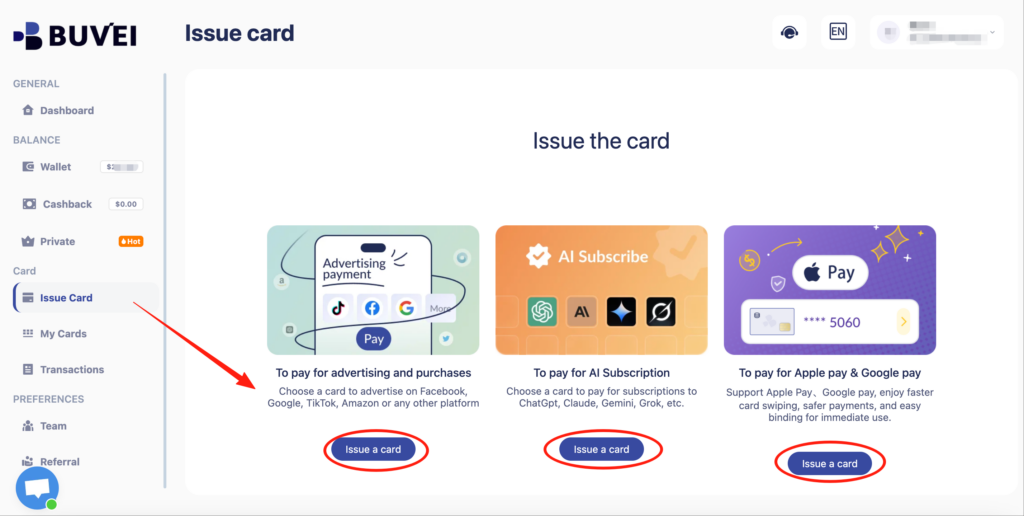
Step 1: Get Your Virtual Card
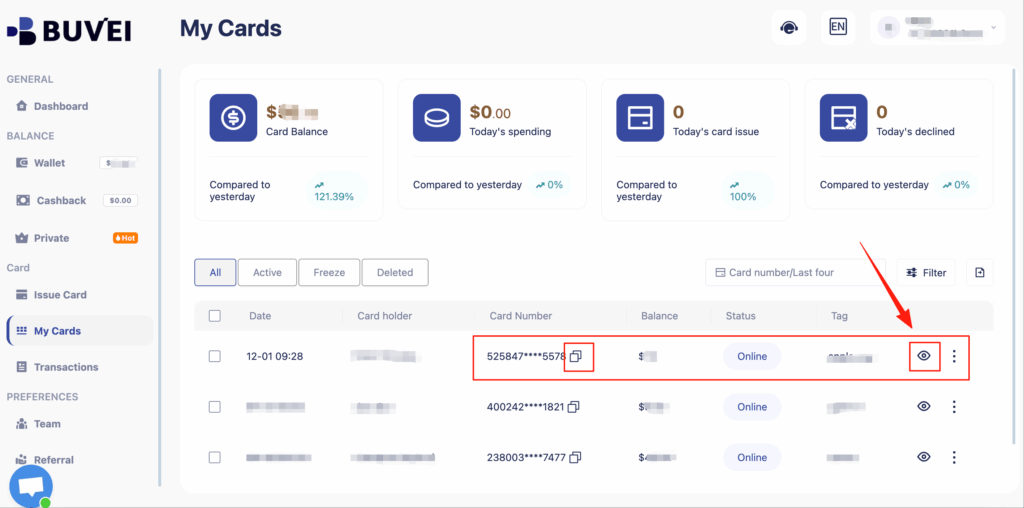
Choose a virtual card provider offering strong compatibility with global platforms. Buvei, for example, issues virtual cards instantly without complicated KYC procedures.
Step 2: Add Funds to the Card
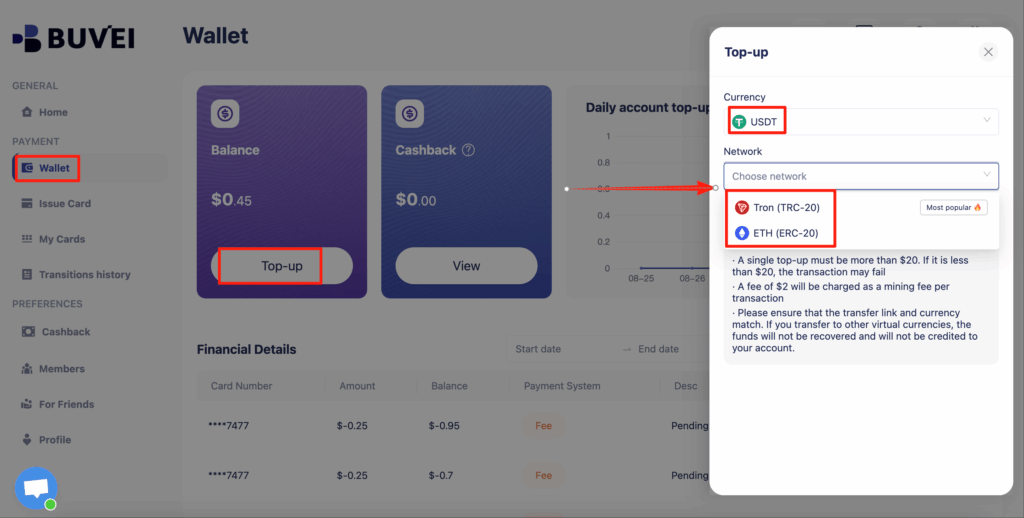
Top up enough balance to cover your Amazon purchase.
If the card provider supports USDT (TRC20/ERC20)—like Buvei—you can fund your card quickly and economically.
Step 3: Go to Your Amazon Payment Settings
Navigate to:
Account → Your Payments → Add a Payment Method
Step 4: Enter Virtual Card Information
Add your virtual card details including:
-
Card number
-
Expiration date
-
CVV
Use a suitable billing address provided by your card platform if needed.
Step 5: Checkout Normally
Select your virtual credit card at checkout.
Amazon will process the payment just like any standard Visa or Mastercard.
Tips for Successful Amazon Payments Using Virtual Cards
• Ensure the Card Balance Covers Potential Variations
Amazon sometimes places temporary pre-authorization charges. A little extra balance avoids declines.
• Match Your Billing Address Correctly
If your virtual card provider gives a recommended address, use it for:
-
Higher payment success rates
-
Fewer verification failures
• Use Separate Cards for Amazon Subscription Services
Amazon Prime, Audible, Kindle Unlimited, and Amazon Music often require recurring billing.
Using different cards helps you manage these easily.
• Keep Cards Active for Refunds
Amazon issues refunds to the original payment method.
Keep the virtual card active until the refund arrives.
Why Many Amazon Shoppers Choose Buvei
Virtual cards vary widely, but Buvei stands out for Amazon shopping due to its practical features:
• Multiple BIN Support for Higher Amazon Approval Rates
Buvei covers global Visa/Mastercard BIN regions, helping reduce declines during Amazon checkout—especially on international stores.
• Strong Compatibility Across E-Commerce Platforms
Buvei works smoothly not only on Amazon but also on:
-
eBay
-
AliExpress
-
Walmart
-
Shein
-
Travel and SaaS platforms
Plus major digital ad systems like Google Ads and Meta Ads.
• Fast and Low-Cost USDT Top-Ups
Buvei supports USDT (TRC20/ERC20), offering:
-
Lower fees
-
Quick balance arrival
-
A convenient alternative for global users
• Instant Virtual Card Issuance Without Complex KYC
You can start shopping online within minutes after creating your account.
• Transparent Fee Structure
Buvei lists all fees clearly—no hidden charges, helping shoppers manage budgets accurately.
• Multi-Card Management for Organized Online Shopping
Create multiple virtual cards under one account—ideal for:
-
Amazon subscriptions
-
Multiple family members
-
Separate business and personal purchases
• Real-Time Online Customer Service
If you face issues during Amazon checkout, Buvei offers immediate support and dedicated account managers.
Summary
Using a virtual credit card for Amazon purchases provides benefits such as:
-
Improved payment success on international Amazon sites
-
Enhanced security for online shopping
-
Better spending control through adjustable limits
-
Easy management of multiple Amazon accounts and subscriptions
With features like multi-BIN support, USDT top-ups, instant issuance, transparent fees, and strong security standards, Buvei makes shopping on Amazon safer, smoother, and more reliable.